

innovara insights

Blog & News
cdd20-klidkegqfoo-unsplash

handy guide: visual aids for the pharmaceutical trainer

In the hands of a skilled pharmaceutical trainer, visual aids focus the attention of the learner on essential elements of the training. Visual aids should be simple, relevant, and pleasing to the eye. They need not be elaborate or expensive.

Some examples of visual aids (other than your slide deck):

  • Whiteboards
  • Objects/models
  • Pictures
  • Videos
  • Flipcharts
  • Maps
  • Charts and diagrams
  • Tech demos
  • Costumes
  • Handouts

Many visual aid problems can be solved using a grid. A grid organizes your content on a page using a combination of horizontal and vertical guides. This gives your content a professional, consistent look and feel. The Grid System has a number of tools and tutorials to help you get started.

For more on visual aids, download our Handy Guide to Visual Aids for the Pharmaceutical Trainer.

typography

Clear, legible, and well-organized typography keeps your learners focused on the content. It is important to choose a font that matches the expectations of your learners. An unprofessional font, such as Kristen ITC, may cause learners to doubt your credibility. A complicated font, such as Vivaldi or Brush Script MT, will create confusion as learners struggle to read your content.

Examples of standard fonts:

  • Helvetica
  • Georgia
  • Calibri
  • Arial
  • Open Sans
  • Times New Roman
  • Tahoma

To keep your written content visually engaging, avoid writing long paragraphs (commonly referred to as walls of text). Use lists, icons, and figures to break up walls of text. Create visual hierarchy by adding subheadings. Avoid long stretches of boldface, capslock, or smallcaps—if everything is bold, nothing is bold.

For more on typography, including the rule of three, serif vs. sans-serif, and spacing, download our Handy Guide to Visual Aids for the Pharmaceutical Trainer.

typo-e1507559572740
wheel

color

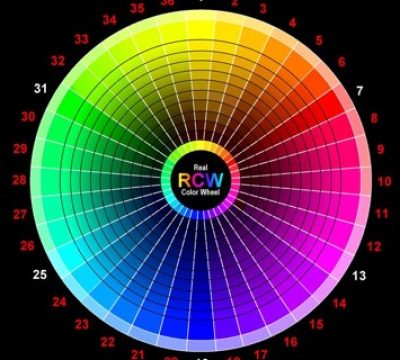
Familiarize yourself with color theory. Use a color wheel to visualize color combinations. There are 3 categories of color on the color wheel:

  • Primary: Cannot be formed by mixing other colors (red, yellow, blue)
  • Secondary: Formed by mixing primary colors (green, orange, purple)
  • Tertiary: Formed by mixing secondary colors (red-orange, yellow-orange, yellow-green, blue-green, blue-purple, red-purple)

Experiment with various color combinations, especially analogous (secondary and tertiary colors that are close together on the color wheel) and complementary (those opposite one another on the color wheel) combinations. Pay attention to the way colors behave in relation to one another – certain colors look different when paired together. Your final palette should neither be boring (extremely unified) nor chaotic (extremely complex).

visual aids for the pharmaceutical trainer: emotionKeep in mind that certain colors evoke emotions in people. This may vary from culture to culture. The Logo Company devised a generalized color emotion guide to follow (pictured left).

A final note on color: It is critical that all visual elements, especially text, stand out sufficiently against your background. If you are unsure, use this free, open-source accessible color matrix builder.

For more on color, download our Handy Guide to Visual Aids for the Pharmaceutical Trainer.

graphs

Your graphs should be clearly labeled and easy to read. Display the maximum amount of information in the least amount of writing and figures.

visual aids for the pharmaceutical trainer

For more on graphs, download our Handy Guide to Visual Aids for the Pharmaceutical Trainer.

This field is for validation purposes and should be left unchanged.